-->

Production manufacturing solution

Translate

Macro Automation in Excel


Macro Automation in Excel


An Excel-based planning system will perform calculation and logic steps in a sequence.  You can use Excel as planning software by automating these steps with macros.  Excel Macros enable you to harness software development techniques and run with the level of coding that is right for you.

Many of our clients have built their planning and scheduling software system in Excel without learning any programming at all.  They have two powerful tools at their disposal.  The first is the Fast Excel Development Template. This tool has many useful functions and macros that are pre-written for you to start using straight away.  The second is the Excel Macro recorder that allows you to record worksheet actions in Visual Basic sofware code.

Macros are mostly used to automate steps that are performed manually in a worksheet. This means that for most of the time they are repeating calculation and data tasks in an environment that is more familiar to most Excel users. VBA does extend far beyond this automation, allowing some powerful programming for advanced users. However, at the basic level the method is kept very simple and for the most part free of having to write any software code.

This means you can focus on the data inputs,  planning logic and reports.  Learn the parts of system development that are most relevant to your business.  Any system can be extended with programming smarts, but you can acheive the core functionality with a zero programming philosophy.

Use Macros to turn Excel into your own production planning sofware.  Get a kick-start in build a planning and scheduling system by using the Fast Excel Development Template and the macro recorder.

Manipulating Tables


Manipulating Tables

Turn Excel spreadsheets into powerful planning and scheduling software.  These simple data manipulation techniques process large tables in a systematic way.  Data processing tasks are broken into steps, with one or more steps performed on a single worksheet.

The method enables you to structure complex planning and scheduling routines into simple stages.  This brings agile software development techniques to Excel without having to learn programming code.

In an Excel-based planning system, each worksheet will typically pull in table data, perform calculations and then present the results to another worksheet or table. Much of the routine is manipulating data, applying formula and presenting it to the next process.

With normalised tables you will often have data to be joined, stacked, exploded or pivoted.  The information and calculation flow in a system is mostly made up of a series of these table operations.

Joining tables


Joining tables is equivalent to a database query. We are using a column of one table as the key to find a unique value associated with it from another table. For example, we might look up the model type for an item code in the order book by joining it with part of the item master.

Experienced users of Excel might be familiar with the VLOOKUP function. With Fast Excel, there is a better way of joining tables using INDEX and MATCH. This is a much more powerful method and results in fast, accurate table joins over hundred thousand rows of data.

Stacking tables


Stacking tables is simply combining two or more tables with the same level of uniqueness. We might wish to take order or forecasts from different regions and combine them into the same table.

Often, the format or columns are different and Fast Excel has a method that is flexible to stack data from many different table formats quickly and easily.

The Fast Excel Development Template has a automatic table stacker that can help you to combine multiple sources of data without needing complex formulas. Download the Development Template here.

Exploding tables


Exploding tables takes summary-level data and explodes each record according to its lower level relationships. The most common explosion in production scheduling is exploding sales demand against its dependent items or exploding a list of parts-to-make against the process routing for all operations required.

The Fast Excel Method uses simple formula logic to perform BOM and Routing explosions. This way enables you to take actual customer demand and calculate the exact resources required in minutes and seconds to fill customer demand. This supports powerful capacity planning functions and feeds the scheduler with the demand and process time requirement.

Normalized Tables


Normalized Tables


The majority of Excel users want to read data in a matrix—computers require tables. Fast Excel Development employs normalized data and pivot tables to calculate efficiently and report data in an appealing manner.


Normalized tables define a systematic data structure in which each fact relationship appears only once. The Item Master, for example, contains Item attributes, and any calculation or report that requires them will query this table.


Normalized data eliminates inconsistencies in facts and ensures that field calculations can be performed in a single column. This both accelerates and simplifies the calculation logic. Matrixes, a common alternative to normalized tables, are never used for calculation or data storage but are instead generated where needed with pivot tables.

Explain Logic


Put all of your logic definitions in one place.

 This is one of the most powerful techniques you will learn as you learn the Fast Excel method. You will define the logic and calculation formula in a single cell and then apply it to thousands of cells at once using this method.


When Excel performs the calculation, the values in the cell are fixed, removing any live formula from the data table. Because the formula is applied at the correct time in the calculation sequence and then frozen as values, the risk of inconsistency and error is eliminated.


This method makes use of a development technique known as Paste-Down Macro. It adheres to recognized software system principles because it makes use of the concept of normalized tables.


Simply by employing the concept of normalized tables and

System Development

 The following are typical considerations to make when developing a system:

Specify

Many people who ask us to develop systems want to start with every feature possible. "We want it all, and we want it now," the song says. Smart developers start with a small scope and expand from there. Determine what causes the most harm in your company. Would you like to:

Make better promises to customers?

Do you know what raw materials to order?

Manage finished inventory levels?

Have better demand visibility?

To begin, pick just one of these.

The first step is to collect all of the necessary data in the form of normalized data tables.

The data extracted from your ERP system is most likely incorrect.

Design

You should have a notion of the reports you want to see if you work in operations rather than information technology. Separate the reports from the calculations and input data while considering the design:

What information would you need to manually prepare the reports, and where is it currently located?

In your enterprise resource planning system?

In Excel spreadsheets?

Someone's mind?

The first step is to collect all of the necessary data in the form of normalized data tables. The data extracted from your ERP system is almost certainly already normalized. Excel workbooks' data may need to be converted from a matrix to a normalized table. Tables will be required to describe data in someone's head, such as product attributes or customer groups.

The key to good design is data structure. Excel 2003 can hold 65000 rows of data, while Excel 2007 can hold over a million, so don't be intimidated by large numbers of records. Try to collect data at a low level of granularity that has not been summarized. Attempt to collect

Integration

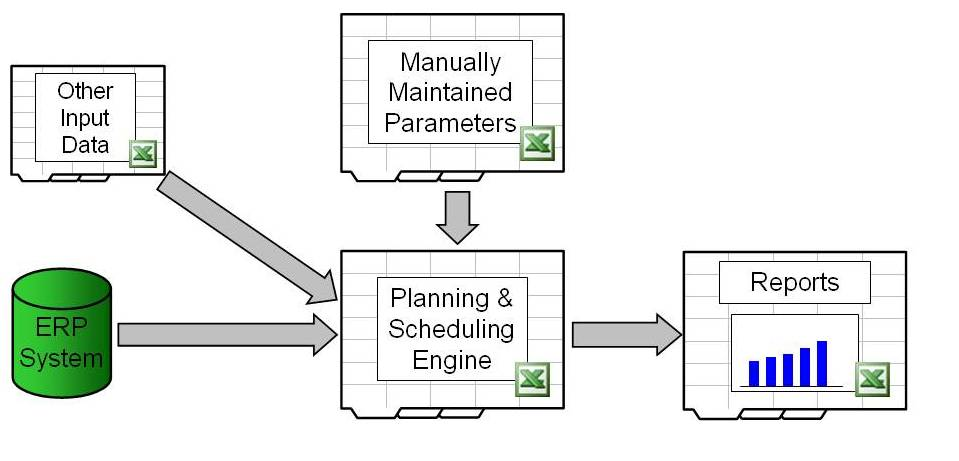
Input data from your materials and production planning software system, as well as other sources, should be integrated. It's also a good idea to separate the application into workbooks for manually maintained parameters and reports, leaving the majority of the calculations to be done in a "engine." The engine's job is to pull in data and output the results of its calculations for reports.


Surprisingly, flat ASCII text files, not Excel files, are the fastest and most dependable way of moving data between Excel workbooks.

Improvement

The introduction of automated planning and scheduling into an organization has a significant and long-term impact on it. People work and interact in a variety of ways, so it is impossible to predict what information will be required to support the organization as it matures. The Methodology is change-aware and allows for quick, "on-the-fly" changes and improvements, allowing the system to grow and mature alongside the organization.

Back To Top